Chapter 3 · concept 2 of 6 · show all
2Tokens, cost and your first RAG
4Chunking
- 4.1Why we chunk, and the main chunking strategies
- 4.2Structure aware chunking and tables
- 4.3Chunk size, overlap and token based sizing
- 4.4Contextual chunking and late chunking
- 4.5Parent child and multi representation indexing
- 4.6Chunk metadata, provenance and the chunking debugging playbook
- Chapter overview
7Finding the right chunks
8When retrieval fails
Parsing, layout and OCR
How text, reading order and structure are recovered from PDFs and scans, the typical ways parsing goes wrong, and how to check a parser before trusting it.
A real question
Why does the text from my PDF read like nonsense?
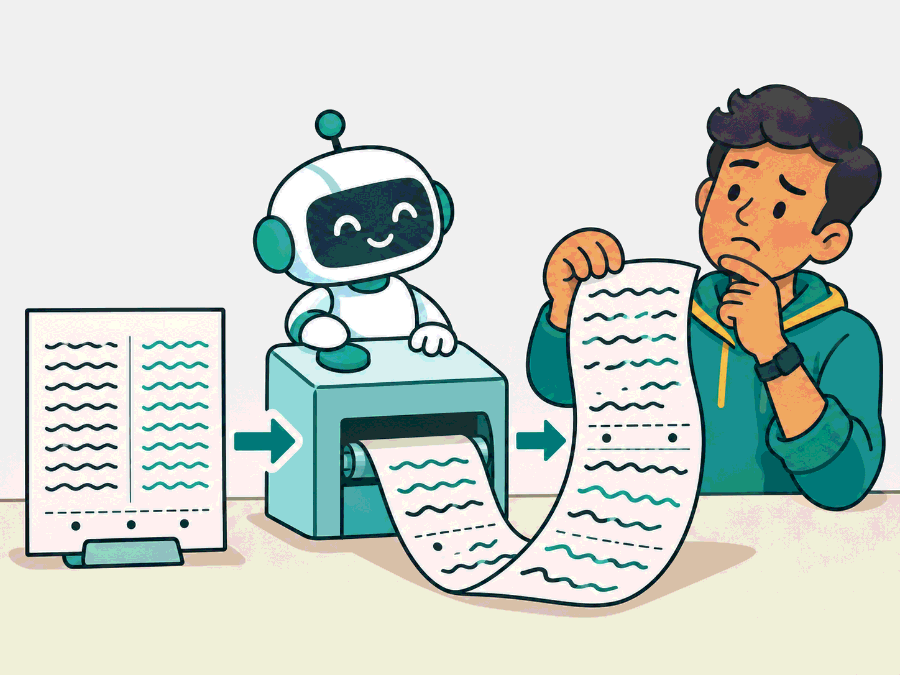
Often the parser read straight across two columns, kept page headers, or flattened a table. Parsing has to recover the characters, their order and their structure.
The problem
Why this matters
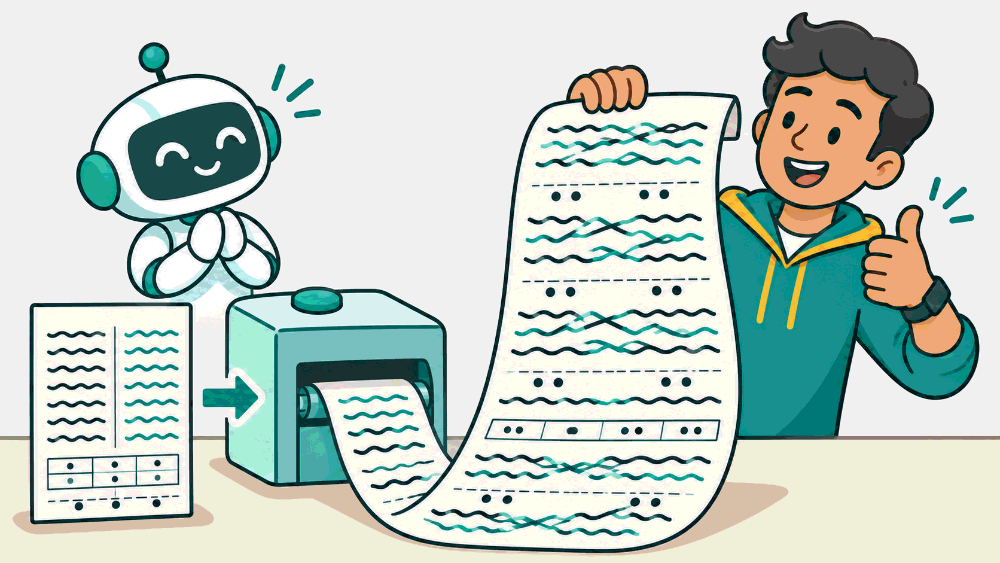
A PDF-to-text call works: text comes out, so parsing is done.
Text coming out is not the same as text coming out right. Mixed columns, repeated footers and lost tables all still look like text.
Why not the simpler way
The simple way is a one-line PDF to text call. On a clean single column report it works. On real documents it merges columns, repeats page headers and footers into every chunk, drops tables or flattens them into a line of numbers, and returns nothing at all for scanned pages. All of this looks like normal text to the next step, so nobody notices until answers go wrong.
The idea
The idea in plain words
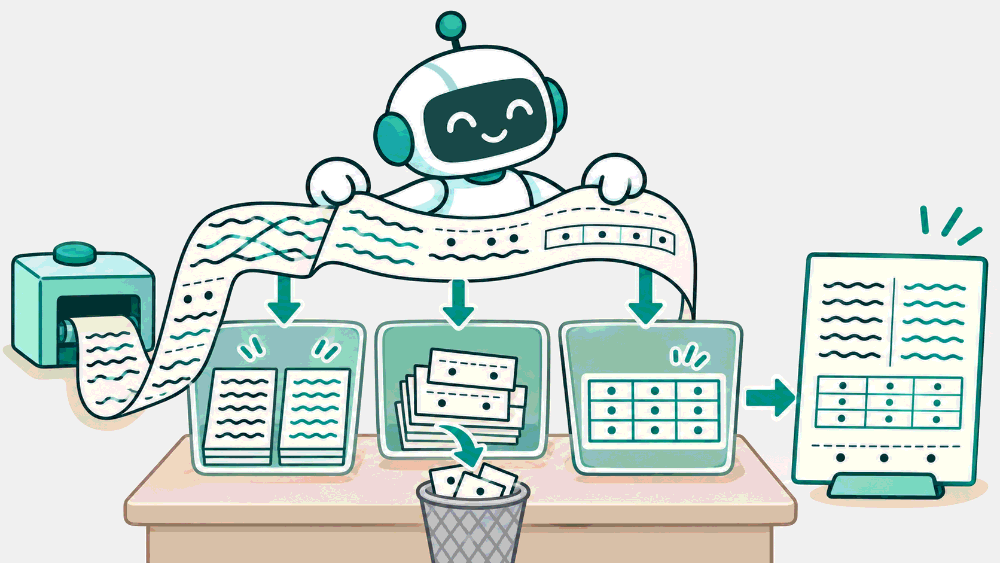
Parsing has three jobs. Extract the characters (from the file, or with OCR from an image). Order them the way a person reads, across columns and around figures. Structure them into headings, paragraphs, lists and tables. Each job can fail on its own.
A parser is a transcriber reading a page aloud to someone who cannot see it. If they read across two columns, or read the page number every time, the listener gets the wrong story.
How it works
Step by step
 1
Extract the characters
From the file, or for scans with OCR, which also gives a confidence score per word.
 2
Put them in reading order
Down the first column, then the second. Skip headers, footers and page numbers that repeat on every page.
 3
Recover the structure
Font size and position reveal headings; aligned cells reveal tables. Keep the page number for citations.
In detail
Digital PDFs store characters with coordinates and fonts. A layout parser groups them into lines and blocks, detects columns, and uses font size and weight to guess headings. Scans first go through OCR, which outputs words with bounding boxes and a confidence score, and then the same layout step. Tables need their own detection: cell borders or aligned columns become rows and cells. Headers, footers and page numbers repeat on every page and should be removed or kept as metadata.
The code
Try it in Python
def strip_repeating_lines(pages: list[list[str]], min_share: float = 0.6) -> list[list[str]]:
    """Remove lines (headers, footers) that appear on most pages."""
    seen: dict[str, int] = {}
    for page in pages:
        for line in set(page):
            seen[line] = seen.get(line, 0) + 1
    repeated = {l for l, n in seen.items() if n >= min_share * len(pages)}
    return [[l for l in page if l not in repeated] for page in pages]

pages = [["Polder Bank Report 2025", "Revenue grew.", "Page 1"], ["Polder Bank Report 2025", "Costs fell.", "Page 2"]]
print(strip_repeating_lines(pages))  # page numbers differ, so they stay; the header goes
See it
What we measured
Not measured yet · parser comparison on real documents
Not measured yet. The Polder corpus is markdown, so it has no parsing step to test.
Not measured yet. Planned: export 3 Polder documents to PDF (one with two columns, one with the FiberBox error table, one scanned), parse them with two parsers, and compare evidence recall@3 against the markdown originals.
Try it on a real example
Two short columns from a manual page, read two ways
Illustration built from real FiberBox sentences
Each sentence stays whole, so it can be chunked and found.
Choosing
Use it when, avoid it when
- A layout-aware parser for PDFs with columns and tables
- OCR with confidence scores for scans, plus review of low-confidence pages
- Plain text extraction on complex PDFs
- Choosing a parser from its demo instead of your hardest pages
What it costs · Layout parsing and OCR are slow and sometimes paid per page. Run them once per document version and cache the result.
In production
Choose a parser by testing it on your own documents, not on its demo. Pick 10 to 20 pages that cover your hardest cases (two columns, tables, scans, footnotes) and compare the parsed text with the page. Track OCR confidence and flag low-confidence pages for review. Store the page number and position with each block, so a citation can point to the right page.
Watch out
Common mistakes
- If text comes out, parsing worked. Scrambled order and lost tables still produce text.
- OCR is solved. It is good on clean scans and still makes errors on stamps, handwriting and low resolution.
- One parser fits all formats. Test per document type.
Check yourself
Remember this
Remember these
- Parsing has three jobs: characters, reading order, structure.
- Common failures: mixed columns, repeated footers, flattened tables, empty scans.
- Choose a parser by testing your own hardest pages, side by side with the original.
- Not measured on our corpus yet: it is markdown, so it has no parsing step.
Say it in an interview
- 01Parsing has three jobs: extract characters, order them, and recover structure.
- 02Common failures are merged columns, repeated headers, flattened tables and empty scans.
- 03OCR gives words with positions and confidence, and I review low-confidence pages.
- 04I choose a parser by testing my 10 to 20 hardest pages side by side.
- 05I store page and position per block so citations point to the right page.
Quick quiz